If you are a blogger (or if you read blogs at least), you most likely know what nofollow is (if not, read this article from Wikipedia).
Also, if you are a blogger you’re most likely interested to get as many links as you can, but avoid nofollow links (why? because they simply don’t count for search engines – yes, I know this is different for various search engines, but big G doesn’t care about them).
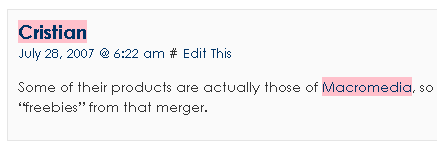
What you need in this case, is this little script to highlight links (it colors them in pink, but can be easily modified if you know a bit of CSS).
What you need in order to use this script is Firefox with Greasemonkey extension – both very easy to install.
After this, just install this little script: nofollowhighlight.user.js (1KB)
If you want to highlight the links in a different color (or add another styling, go to Greasemonkey options (right click on the monkey head from the taskbar), select Manage user scripts, there select Nofollow highlight and click on the Edit button.
This will edit the file in your text editor. What you need to change there is this line:
theStyle += "background-color: pink";
You can change for example this into theStyle += "text-decoration:line-through;"; – this will make the nofollow links have a strike through. It simply depends on what you like best.
The script is based on Gareth Simpson’s first version.




It’s more useful to install Stylish and go to userstyles.org and look for link highlighters, or create your own. The CSS is pretty simple.
[rel*=”nofollow”] {
background-color: pink !important;
text-decoration: line-through !important;
border: 1px dashed grey;
border-style:transparent;
}
I just installed firefox and i am grateful to you for posting about the helpful script for firefox.
Thanks for this. Just what I needed. Other addons I found had other features included which I didn’t want. This lets you customize it exactly how you prefer. Cheers!
Thanks Indy. SEOQuake has also such feature (strikethrough).
Thanks Bro….
Thanks for the script!
Thanks for the link, I don’t currently have greasemonkey installed, but I’ll give it a try for this script.
thanks for the script…this is realy help
Nice that you posted this and all, but you might want to turn off nofollow yourself if you’re going to preach about it. Sorry, pet peeve of mine!
Thanks for posting this solution. Updating the profile manually makes me a bit nervous. This solution is much better and easier to uninstall if needed.
bailey
I’m the only one in this world. Can please someone join me in this life? Or maybe death…
thanks for solutions
What a wonderfull article..
Thank you..
it helps me much..
Just started a blog talking about getting traffic to a Google Blogspot Blog. Most importantly, how to support the trend of making comment links DOfollow.
Hi! I was surfing and found your blog post… nice! I love your blog. 🙂 Cheers! Sandra. R.
I love your site. 🙂 Love design!!! I just came across your blog and wanted to say that I
Sign: umsun Hello!!! rcuwwymhyw and 5942ssgfhphzye and 7043Cooooool blog really
thanks for the tips
Thanks for the helpfull installation guide! Much obliged.
thanx for the script , God bless you
Hello,
Nice to be registered on blog.bubble.ro. My little name is maxizhu 😉
=
http://forums.navalwarfare.net/member.php?103057-Slatly1989
What a great tip.
I’ve now got the nofollow links highlighted.
Cheers
Nice tip.
Thank you
First search after highlight and solved my problem.
I could not download the addon to operate.
I think the link is broken
=
Omul .. Excelent .. Amazing .. Voi marcaj site-ul dvs. şi să iamulţumit alsoI’m feed-uri pentru a căuta informaţii utile atât de multe , chiar aici în acest post, am dori dezvolta strategii suplimentare în acest sens , mulţumesc pentru partajare . . . . . .
Amtsgericht Bad Hersfeld Aktenzeichen: HRB 2126 Bekannt gemacht am: 18.02.2010 12:00 Uhr
Veröffentlichungen des Amtsgerichts Bad Hersfeld In () gesetzte Angaben der Anschrift und des Geschäftszweiges erfolgen ohne Gewähr.
Löschungen von Amts wegen
30.12.2009
Florian Grotehans Vermögensverwaltungs-GmbH, Bad Hersfeld, (Am Baumgarten 12, 36251 Bad Hersfeld).
Die Gesellschaft ist gemäß § 394 Absatz 1 FamFG [b]wegen Vermögenslosigkeit[/b] von Amts wegen gelöscht.
Florian Grotehans Vermögensverwaltungs GmbH vermögenslos!
Thanks a lot, I’ve linked too you though my blog as this is extremely useful
Thanks a lot
Harry @ Web Design Bournemouth
I cherished as much as you’ll receive carried out right here. The sketch is attractive, your authored material stylish. however, you command get bought an nervousness over that you would like be turning in the following. ill definitely come further earlier again as precisely the same nearly very steadily within case you defend this hike.
=