Ok, please tell me I’m not the only one annoyed by the stupid WYSIWYG editor in WordPress (the Visual one). I lost 2 posts because it simply didn’t like me 😐
And after years (ok, minutes) of searching I found out how to turn it off (I sure look like a newbie by now) – and no, if you thought you can just edit a file and get rid of it, you can’t that easily, but then again, there’s an even a more simple way.
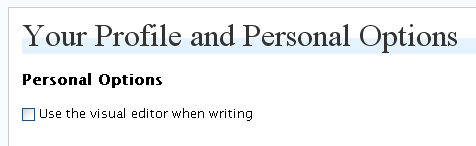
In your profile editing page (Users -> Your Profile) you have a check box Use the visual editor when writing. I strongly suggest you turn the damn thing off (and I still don’t get it why it’s turned on by default – it’s one of the buggiest editors I’ve seen so far).
If you want to get rid of the editor completely (you’ll end up with a simple box – not exactly too friendly, so only use this if you really know what you’re doing), you can simply delete or rename the directory wp-includes/js/tinymce/.




This is my first post
just saying HI
100% true mate!. I’ve been blogging for a while and its annoying the way editor acts.
Thanks for the tip 😉 .
STN
I found this very helpful! Thanks 🙂